
Download TextTV APK – text tv, teletext, svt, tv3, tv4, bbc ceefax, rte aertel, free app, browse teletext
Overview
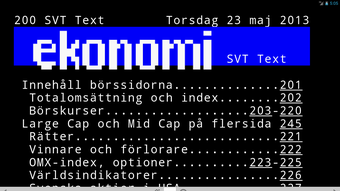
TextTV is a free Android application designed for users interested in accessing teletext services from both Swedish and international broadcasters. The app enables users to browse teletext pages from major providers such as SVT, TV3, and TV4 in Sweden, as well as BBC Ceefax on BBC1 and BBC2, and RTE Aertel from Ireland. Its primary purpose is to provide a modern, accessible interface for viewing legacy teletext content, which traditionally required specialized hardware or television sets.
This makes it particularly useful for users who wish to access archived news, weather reports, sports updates, and program schedules in a digital format. The app targets both casual users and enthusiasts of vintage broadcasting technology, including digital archivists, media students, and fans of retro media formats. While the developer is listed as TextTV, no additional background on the organization or development team was provided.
Real-world usage scenarios include checking real-time news updates, reviewing historical programming data, or exploring archival content from European broadcasters. The app functions entirely on Android devices and does not require a physical TV signal or subscription.
Key Features & Capabilities
- Multi-Provider Teletext Support – Access to teletext pages from SVT, TV3, TV4, BBC Ceefax (BBC1 and BBC2), and RTE Aertel, allowing users to view content from multiple regional and international broadcasters.
- Direct Page Navigation – Users can enter a specific teletext page number in a text input field to jump directly to the desired content, improving efficiency for frequent users.
- Gesture-Based Browsing – Swipe left or right across the screen to navigate between adjacent teletext pages, enabling intuitive and fluid navigation without complex menus.
- Link Following – Tap any highlighted link within a teletext page to follow it, simulating the interactive experience of original teletext systems.
- Content Sharing – Share any displayed teletext page via email, messaging apps, or social media platforms using a simple share function or long-press gesture.
These features are designed to replicate the original teletext experience while adapting it to modern mobile devices. For example, a user can quickly access a weather forecast from BBC Ceefax by entering page 110, then swipe to view related updates. Similarly, a student researching broadcast history may use the app to compare how news was presented on SVT versus RTE Aertel during the 1990s. The ability to share pages supports content dissemination in educational or social contexts, making it a practical tool for digital preservation and informal knowledge sharing.
User Interface, Workflow & Performance
The user interface of TextTV is described as user-friendly, emphasizing simplicity and ease of navigation. The layout appears to center around a full-screen display of teletext pages, with minimal on-screen controls to avoid visual clutter. Navigation is handled through a combination of direct input (page number entry), touch gestures (swiping), and tap actions (following links).
The workflow is streamlined, allowing users to access content with few steps from launch to viewing. While specific details on performance, CPU usage, or memory consumption were not provided, the app’s file size of 4.5 MB suggests a lightweight design optimized for mobile environments. The developer did not specify resource usage details.
Stability and responsiveness are expected to be consistent with standard Android applications of similar scope, though actual performance may vary based on device capabilities. No reports of crashes or lag were mentioned in the provided description. The app appears to function entirely offline once launched, with no requirement for continuous internet connectivity after initial access to content, which enhances usability in low-bandwidth scenarios.
Compatibility & System Requirements
TextTV is designed for Android devices and is compatible with the Android operating system. The current version is 2.0.1, released on October 15, 2023. The installation size is 4.5 MB, indicating a compact footprint suitable for devices with limited storage.
The developer did not provide additional system requirements, including minimum Android version, screen resolution, or hardware specifications. As such, compatibility beyond the general Android platform remains unclear. Users should verify whether their device meets the necessary conditions for running the app, especially if using older or non-standard Android versions.
The app is available exclusively through the Google Play Store, which ensures standard distribution and security checks. No information was provided about support for tablets, wearables, or other form factors.
Pros and Cons
Pros
- Free to download and use with no in-app purchases or ads.
- Supports multiple teletext providers including major Swedish and international broadcasters.
- Intuitive navigation via page number input, swiping, and tapping.
- Lightweight design with a small file size of 4.5 MB.
- Allows sharing of teletext pages across social media and messaging platforms.
Cons
- Exact system requirements and minimum Android version were not specified.
- Performance details such as CPU or RAM usage were not provided.
- Only available on Android; no support for iOS or other platforms.
- Limited to teletext content; no additional multimedia or interactive features.
- Relies on the availability of teletext streams from broadcasters, which may vary over time.
FAQ Section
Is TextTV available for iOS devices?
TextTV is currently only available for Android. No information was provided about iOS compatibility or future plans for other platforms.
Is the app secure to download?
TextTV is available through the Google Play Store, which implements standard security measures for apps. The app is described as secure, but users should always download from official sources to avoid potential risks.
Does the app require an internet connection?
While the app may use the internet to load teletext content, it does not require a constant connection. Once a page is loaded, it can be viewed offline. However, real-time updates may depend on connectivity.
How often is the app updated?
The latest version, 2.0.1, was released on October 15, 2023. No information was provided about the frequency of future updates or update policies.
Can I use TextTV without a TV signal?
Yes. TextTV does not require a physical TV signal or cable subscription. It accesses teletext data through online streams or archived sources, making it fully functional on mobile devices without traditional broadcast hardware.
Final Thoughts + CTA
TextTV delivers a focused and functional solution for users seeking access to teletext services from Swedish and international broadcasters. Its clean interface, multi-provider support, and ease of navigation make it a standout tool for enthusiasts and researchers alike. While the app lacks detailed technical specifications and platform diversity, its lightweight design and free access enhance its appeal.
The ability to share content and navigate with gestures adds practical value. For anyone interested in exploring historical broadcast content or staying informed through legacy media formats, TextTV is a compelling choice. It is especially valuable for users who appreciate digital preservation and retro technology.
Download TextTV now to explore the world of teletext on your Android device.







